
Wireless Powerline adapter guide
Wireless Powerline adapters extend your wireless network around your home without the need for long cables by using your existing electrical wiring.
Our wireless Powerline kit includes a pair of adapters. One adapter is the Powerline Transmitter which you'll need to connect to your router, and the other is the Powerline Receiver which should be placed where you'd like to extend your wireless coverage.
Getting set up
Plug the Powerline Transmitter into a plug socket near your router and switch it on. The Power Light will turn green.

Connect the Powerline Transmitter to your router using the Ethernet cable. The Ethernet light will turn green.

Plug the Powerline Receiver into a socket close to the Powerline Transmitter and switch it on. You can move it after you have paired it with your router.

When the Powerline Transmitter pairs with the Powerline Receiver, the Powerline light will turn green. If the adapters do not pair automatically, you'll need to press the pair button on the transmitter for 2 seconds.

Press and hold the pair button on the Powerline Receiver until the Power light becomes solid amber.
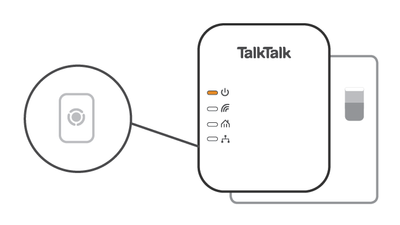
After releasing the pair button the Wi-Fi light will start blinking. Now press the WPS button on your router.
If the connection is successful, the Wi-Fi light will stop blinking and the Power light will turn solid green for 6 seconds. Once paired, you can move the Powerline Receiver to another room.
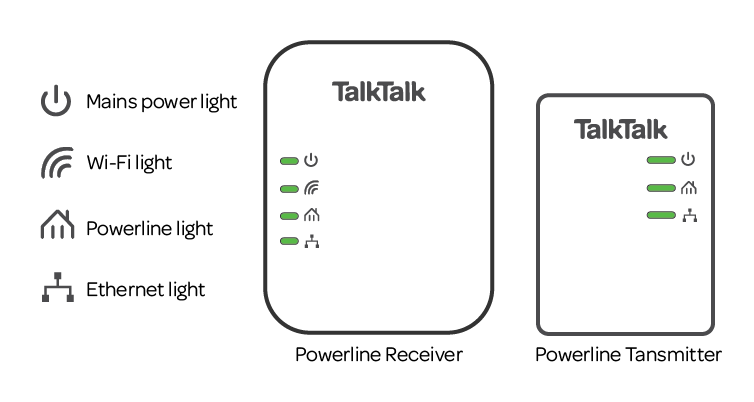
| Light | Status | Description |
|---|---|---|
| Mains power | On | Power on and ready. |
| Blinking | Adapter is setting up after reset button has been pressed. | |
| Off | No power. Make sure the wall socket and the adapter are switched on. | |
| Wi-Fi | On | Adapter is connected to Wi-Fi. |
| Off | Wi-Fi not connected. | |
| Powerline | On | Adapter is connected to another adapter. |
| Off | No other adapter found. | |
| Ethernet | Blinking | Ethernet cable is connected and data is being sent over the connection. |
| Off | No Ethernet connection detected. Make sure the Ethernet cable is connected to the adapter and your router. |
If you're having problems, here's how to fix a problem with your wireless powerline adapters .